One client could see all 59 portfolios
A client account in a client's app saw every portfolio because the query trusted one stale flag, and no test had ever used a record that disagreed with itself.
- Filed
- Reading
- 4 min
- Outcome
- Fixed
- Series
- The app I can't read
On 26 September 2026 a client account in an app I look after showed all 59 portfolios. That account should have shown one. Agents built the app and I can’t read its code.
The app had been live for a few days.
What went wrong
Each client account is tied to one client and the portfolios that client owns. A manager account is different. It has no client behind it and a special grant that says “show everything”.
This client account carried that grant as well. A leftover grant, labelled as an operator one, had been created on 23 September. The old query looked at the grant and nothing else. If the grant was there, you saw everything.
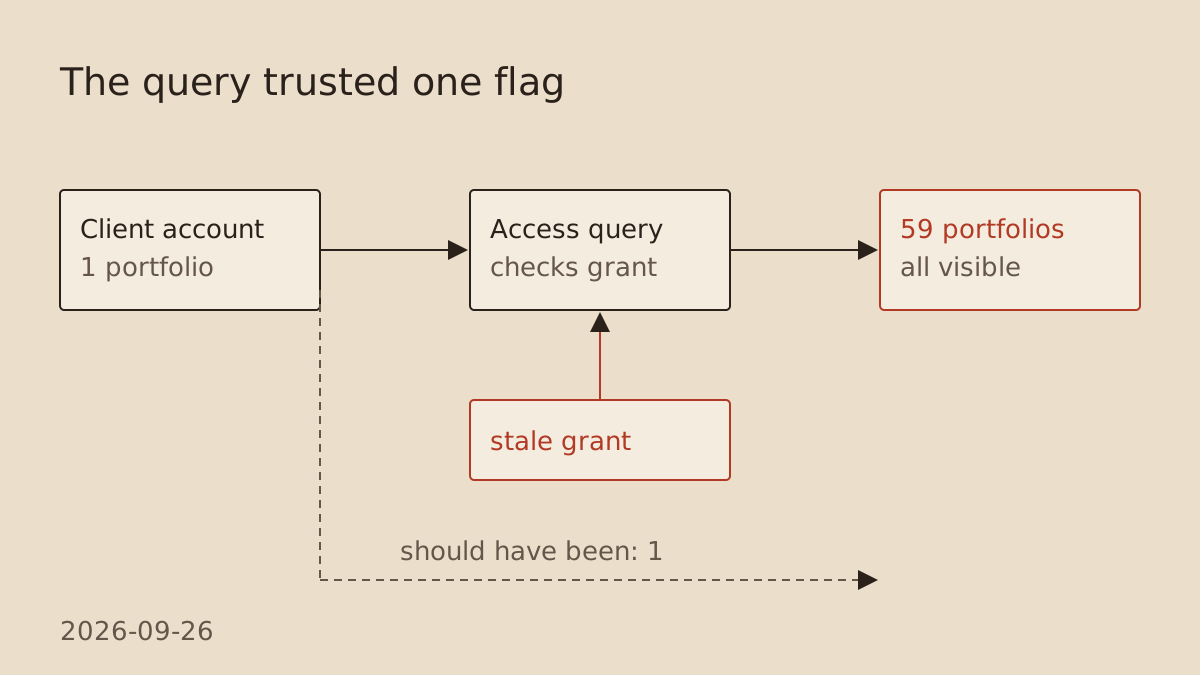 Figure: the query asked one question, the stale grant answered yes, and the client got all 59 portfolios instead of one.
What I don’t know
I don’t know who created the grant, or what action did. I don’t know how long the exposure lasted. The list was visible. The evidence doesn’t say whether anyone opened another client’s portfolio page. I’d like to have those answers and I don’t.
The audit
Removing one grant fixes one account. So the agent ran a read-only audit across every client account looking for the same mismatch. It found one more. After both were removed, production had zero such grants on client accounts and nine separate manager accounts.
The rule now
Access to everything needs three things together:
- The account is a manager account.
- It has no link to a client.
- It holds the grant.
If any one is missing, the answer is no. The same check runs for email login and for reading portfolios. A database migration also rejects any new grant that doesn’t fit, so the bad state can’t be created the same way again.
The wider rule I took from it: when an identity is unclear, disabled or ambiguous, the app refuses. It doesn’t guess. A designed error message points the person to the firm.
The agent checked the fix on an isolated database by recreating the stale grant on purpose. A fresh backup passed a restore test. The live API then returned exactly one portfolio for a short-lived session on the affected account. A temporary manager account signed in by email and saw all 59. The temporary accounts and test setup were deleted afterwards.
Why the tests missed it
The earlier end-to-end run and the manager smoke test were both proper tests, and both passed. Neither included a client account carrying a grant it shouldn’t have. Every record in the tests was consistent. The production record wasn’t, and no test had ever created one like it.
That is the part I can act on without reading code. I now ask for a test with deliberately wrong data. For any new role, importer or login path I want to see a test that builds a record that contradicts itself, and shows the app refusing it. A pass on tidy data tells me about tidy data.
Before this goes live, try to break it with bad data.

This change touches who can see what (a new role, a new import, or a new way to log in). Write tests that:
1. Build a user or record that contradicts itself on purpose, for example a client account that also has manager rights, or access to data that belongs to someone else.
2. Show that the app refuses it or hides the data, and that the wrong person sees nothing.
3. Then, read-only, check whether any real account matches the bad case. Don't copy customer data anywhere and don't change anything. Then tell me in plain words: what you tried, what the app did, and whether any real account matches the bad case right now.
How to use it
Paste it into the chat whenever an agent builds anything about logins, roles, permissions or imports of customer data, before you let it go live.
What to look for: a plain yes or no to the last question. If any real account matches the bad case, stop and fix that first.
The same rule, three weeks later
On 20 October the app began syncing contract status from its data source. Ten contracts had ended there, and one of them was still published to a client who could sign in.
The obvious way to block someone is to disable their login. The agent found that disabling a login wipes the password. So ended contracts block sign-in through a check worked out from contract status instead. Data and password stay. Sessions end.
I decided a client is blocked only when every portfolio they own has ended. Ended portfolios are hidden from clients, and managers see them listed last. As of 20 October nine portfolios are hidden and nine clients can’t sign in. The daily reader refuses to change anything if its lists don’t add up, and a brake holds any run that would end more than three portfolios at once. The first run was held, as designed, and applied with exactly the nine I had approved.
It’s the same shape as September. Access comes from the facts, and when the facts are unclear the app says no.
Revision record
| First published. | |
| Fact-checked: the per-portfolio ended marker was deferred, not unconfirmed; counts dated. |