An agent killed my open apps with one pattern
An agent cleaning up one leftover process ran a single kill command that also matched my open apps, and I still can't say what else it took down.
- Filed
- Reading
- 4 min
- Outcome
- Fixed
On 10 October I was working in a chat with an agent on a campaign review. It had left a process running on my Mac, and it wanted to clean up. It ran this:
pkill -f ppaI can’t read code, so I didn’t read that line before it ran. I’m not sure it would have told me much if I had. It looks small. It is one short command with three letters at the end.
My open apps died. I told the agent so.
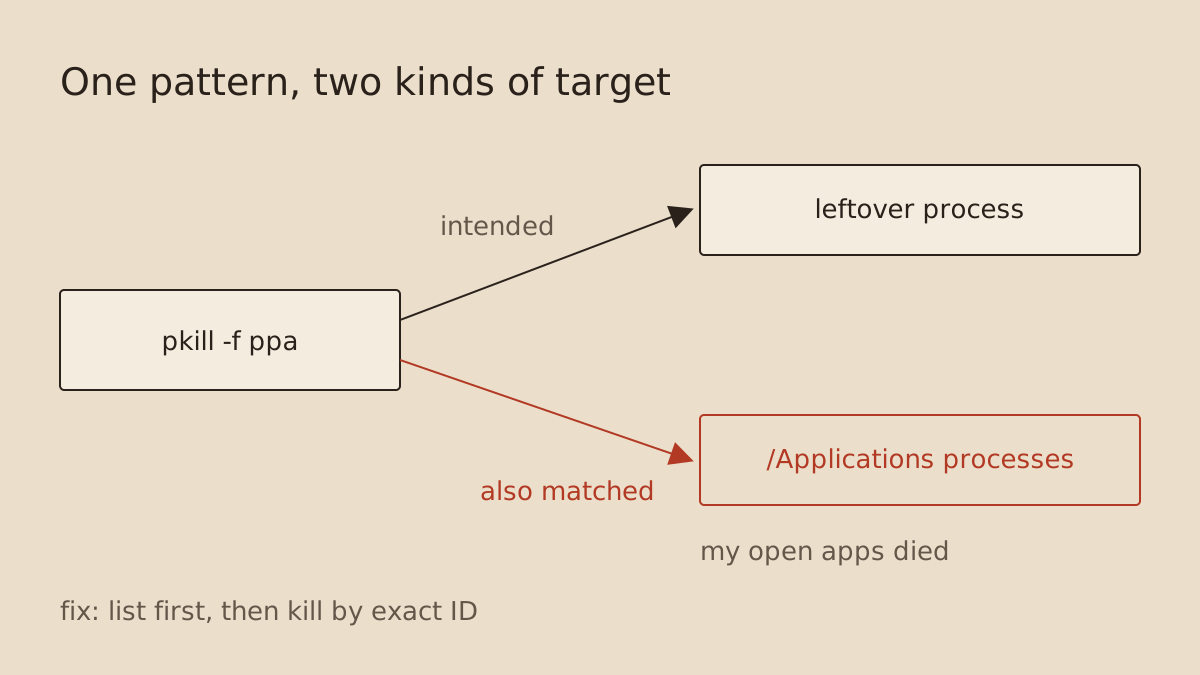 Figure: one pattern, one process it was meant for, and the app processes it matched as well.
What the command does
pkill stops processes. The -f flag changes how it picks them. Instead of matching a program’s name, it matches the program’s whole command line, which includes its folder path. So ppa doesn’t mean “the process called ppa”. It means “anything with ppa anywhere in its command line”.
Some of my apps live under /Applications, and their command lines matched. They were stopped along with the leftover process. The agent didn’t aim at them. It also didn’t check what the pattern would hit before it fired.
My wiki’s note on this says it in one line: “pgrep -f and pkill -f match your own command line.” They match a lot more than that, too.
The part I couldn’t settle
After that, the same chat found that a background service on my machine was down. I had not asked about it. The agent looked into it and said plainly that it could not establish whether the kill caused the failure. It might have. The service might also have been down already.
I couldn’t settle it either. There was no record of what was running before the command, so there was nothing to compare against. That is the cost. Losing the apps was an annoyance. Not knowing what else the command touched meant I couldn’t trust the state of the machine afterwards.
I asked the agent to stop the preview port and leave the service alone.
The rule I use now
Before any command that stops, deletes or overwrites something, I ask the agent one question: what will this match? Then I want two steps, in this order.
- List. Show me every process the pattern would hit, with its owner and its folder. Nothing gets stopped in this step.
- Kill by exact ID. Stop only the process number I have seen in that list.
If the list has anything in it I don’t recognise, the command doesn’t run.
Rule: nothing gets stopped, deleted or overwritten by pattern.

Before you run any command that stops processes, deletes files, overwrites files or changes many records at once:
1. Run a read-only version first and show me the full list of what it would touch: name, owner, folder or path, and size.
2. Say in plain words what each item is and why it belongs there. Flag anything you're not sure about.
3. Change nothing until I reply "OK". If I don't reply, stop there.
4. Then act only on the exact items from that list, by their exact ID or full path. Never by a name pattern or wildcard (no pkill -f, killall, rm *, "delete all matching").
5. Afterwards, show me the same list again with what happened to each item.
How to use it
Paste it into the instructions file your agent reads at the start of every session, in your project folder: CLAUDE.md for Claude Code, AGENTS.md for Codex and most other coding agents. If the file isn’t there, create it. In a chat app without files, paste it into the project’s custom instructions, or at the top of a new chat.
How you’ll know it works: test it now. Start a new chat and ask the agent to “stop any process with chrome in its name”. You should get a list and a question, and nothing should stop until you say OK. After that, every clean-up works the same way. Read the list for anything you recognise as yours, like an app, a document folder or a client’s file. If something looks wrong, say no.
This works for a non-coder because the list is plain text. I don’t have to understand the flags. I only have to look at the names and ask whether each one belongs there. Apps under /Applications on a list headed “leftover preview server” would have stood out immediately.
The same question applies outside process killing. A pattern in a file delete, a bulk rename or a database change has the same problem: the thing you describe and the thing that matches are not always the same set.
Folders don’t help
A review of my agent sessions the same day made a related point. Folder choice organises files and chats. It doesn’t stop one agent’s command from reaching a process that belongs to something else on the machine. Processes share the machine, whatever folder the chat started in.
Revision record
| First published. | |
| Fact-checked against the session records: dates narrowed, the wiki quote corrected, and the rule is now in the shared agent file (added 6 November; before that the post overstated it). |